Table of Contents
Template structure & Overriding templates via a theme
注意 このドキュメントはPHPテンプレートを使用するクラシックテーマについて言及しています。HTMLテンプレートを使うブロックテーマに取り組んでいる場合、ブロックテーマ用のThemingドキュメントを確認してください。
概要
Overview
WooCommerceテンプレートファイルには、あなたのストアのフロントエンドとHTMLメールのマークアップとテンプレート構造が含まれています。
Template list
The various template files on your WooCommerce site can be found via an FTP client or your hosts file manager, in /wp-content/plugins/woocommerce/templates/. Alternatively, you can find the template files on our repository on GitHub.
注:旧バージョンのテンプレートファイルをお探しの場合は、これらのパスにあります:
- Versions 6.0.0 and later:
https://github.com/woocommerce/woocommerce/tree/[VERSION_NUMBER]/plugins/woocommerce/templates- For example, to find the template files for WooCommerce 9.4.0, you would navigate to https://github.com/woocommerce/woocommerce/tree/9.4.0/plugins/woocommerce/templates.
- Versions prior to 6.0.0:
https://github.com/woocommerce/woocommerce/tree/[VERSION_NUMBER]/templates- For example, to find the template files for WooCommerce 5.9.0, you would navigate to https://github.com/woocommerce/woocommerce/tree/5.9.0/templates.
Changing Templates via Hooks
テンプレート・ファイルを開くと、テンプレート・ファイルそのものを編集することなくコンテンツの追加や移動ができる「フック」が含まれていることに気づくでしょう。フックとは、あるコード片が、あらかじめ定義された特定の場所で、別のコード片と相互作用したり変更したりするための方法です。この方法によって、テーマの特定の場所に「フック」するコード・スニペットを実装することができます。テンプレートファイルにはまったく手を加えず、子テーマを設定する必要もないので、アップグレードの問題を避けることができます。
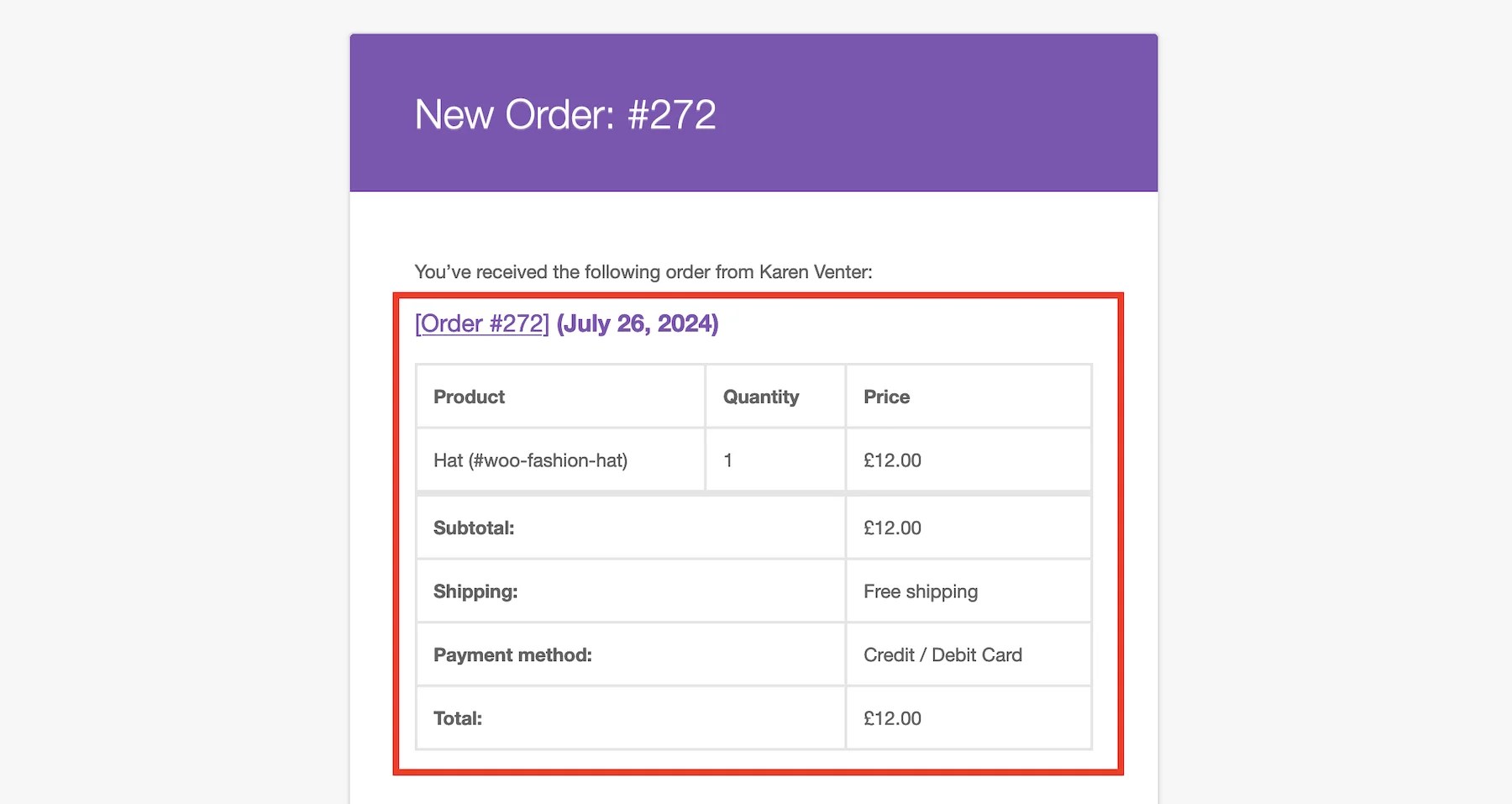
Let's take a look at /wp-content/plugins/woocommerce/templates/emails/admin-new-order.php and see what a hook looks like. Starting on line 30, we see the following code, which is responsible for producing the order details section of the New Order email.
/*
 * @hooked WC_Emails::order_details() Shows the order details table.
 * @hooked WC_Structured_Data::generate_order_data() Generates structured data.
 * @hooked WC_Structured_Data::output_structured_data() Outputs structured data.
 * @since 2.5.0
 */
do_action( 'woocommerce_email_order_details', $order, $sent_to_admin, $plain_text, $email );
上のコードは、下の画像で赤くハイライトされているブロックを出力します。これは、ショップマネージャーが、サイト上で注文が成功した後に受け取る新規注文メールです:
以下のコードは、希望する機能を構築するための出発点として使用することができます。このコードをコード・スニペット・プラグインに追加することで、テンプレート自体を編集することなく、テンプレートの特定の場所で出力を変更することができます。他のフックについても同様です。
add_action( 'woocommerce_email_order_details', 'my_custom_woo_function');
function my_custom_woo_function() {
    /* Your code goes here */
}
Changing Templates by Editing the Files
プラグインや親テーマのファイルを直接編集すると、サイトを停止させるようなエラーを引き起こす危険性があります。さらに重要なのは、この方法で加えられた変更は、プラグインやテーマがアップデートされると消えてしまうということです。
Instead, the recommended approach is to set up a child theme, which creates a safe directory where to make overriding changes that will not be automatically updated.
For this example, let's call our child theme storefront-child. With storefront-child in place, edits can be made in an upgrade-safe way by using overrides. Copy the template into a directory within your child theme named /storefront-child/woocommerce/ keeping the same file structure but removing the /templates/ subdirectory.
To override the admin order notification in our example, copy wp-content/plugins/woocommerce/templates/emails/admin-new-order.php to wp-content/themes/storefront-child/woocommerce/emails/admin-new-order.php
コピーされたファイルはWooCommerceのデフォルトテンプレートファイルを上書きするので、コピーされたファイルに好きな変更を加えることができ、結果の出力に反映されるのを見ることができます。
注意 テンプレートがアップグレードセーフであることの(望ましい)副作用として、WooCommerceコアテンプレートは更新されますが、カスタムオーバーライドは更新されません。システムステータスレポートに「バージョン3.5.0は古いです。コアバージョンは3.7.0です。このような場合は、古いWooCommerceテンプレートを修正するガイドに従ってください。
Declare Theme Support for Custom Templates
If you are a theme developer or using a theme with custom templates, you must declare WooCommerce theme support using the add_theme_support function. See Declaring WooCommerce Support in Themes at GitHub.
If your theme has woocommerce.php, you will be unable to override woocommerce/archive-product.php custom template in your theme, as woocommerce.php has priority over other template files. This is intended to prevent display issues.
Need support with editing your Woo store? WooExpert agencies are here to help. They are trusted agencies with a proven track record of building highly customized, scalable online stores.
Hire an Expert.