How to enable High Performance Order Storage
2023年10月にリリースされたWooCommerce 8.2から、新規インストール時にHPOSがデフォルトで有効になりました。既存のストアは、以下の手順で「WordPress Posts Storage」から「High-Performance Order Storage」に切り替えることができます。
High-Performance Order Storageを有効にするには、既存ストアはまずpostsテーブルとordersテーブルを同期させる必要があります。
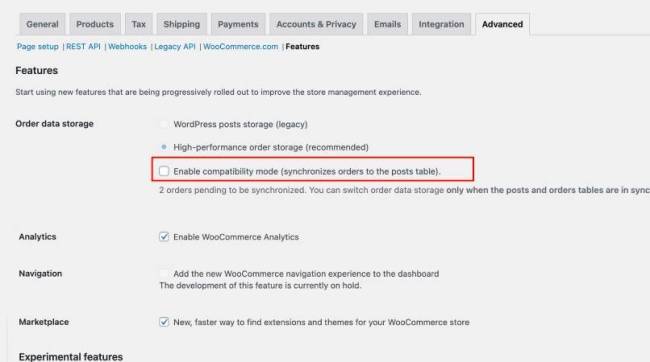
1.WooCommerce > 設定 > 詳細 > 機能**に移動します。
2.互換モードを有効にする(注文を投稿テーブルに同期する)"**設定をオンにします。
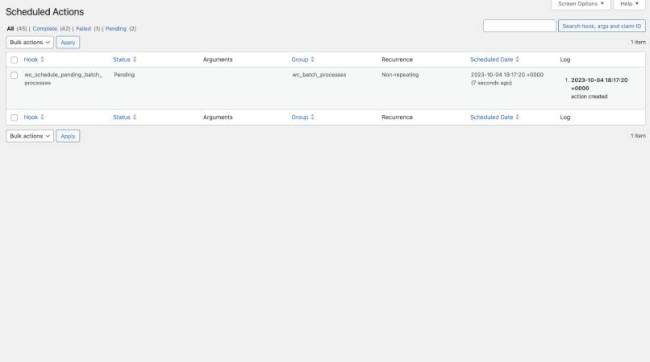
3.この設定を有効にすると、バックグラウンドのアクションがスケジュールされます。
- The action `wc_schedule_pending_batch_process` checks whether there are orders that need to be backfilled.
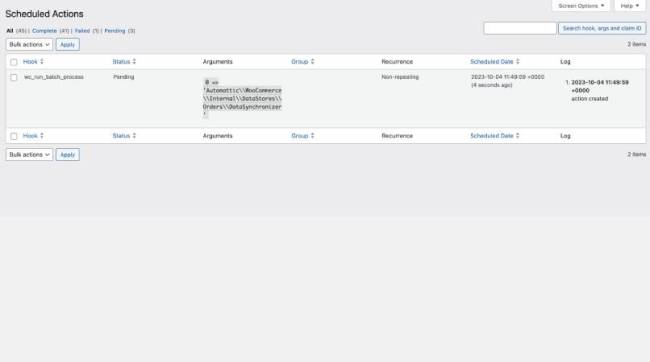
- If there are, it schedules another action `wc_run_batch_process` that actually backfills the orders to post storage.
- You can either wait for these actions to run on their own, which should be quite soon, or you can go to **WooCommerce > Status > Scheduled Actions**, find the actions and click on the run button.
- The action will backfill 25 orders at a time, if there are more orders to be synced, then more actions will be scheduled as soon as the previous actions are completed.
4.両方のテーブルが正常に同期された後、High-Performance Order Storage (HPOS)に切り替えるオプションを選択できるようになる。
- シームレスな移行を確実にするため、しばらく互換モードを維持することをお勧めします。問題が発生した場合は、即座にポストテーブルに戻すことができます。